

Vev
Collection
Jev-like decision models that can also see images: open weights on Qwen3.5, run on your own GPU. github.com/Xiaooolong/vev • 5 items • Updated • 2
Jev-like decision models that can also see images. Ask yes/no, multiple-choice or graded questions about a
piece of text, a JSON record or a screenshot, and get a probability for every allowed answer in one forward pass.
Vev serves the same request format as TypeSafe's
Jev (/v1/systemone), and runs on your own GPU.
Code, API and full results: Xiaooolong/vev.
This repository holds the merged weights: Qwen/Qwen3.5-9B with the Vev adapter folded in. The adapter alone is in CountingSheep/vev-9b-lora. The other size is CountingSheep/vev-4b.
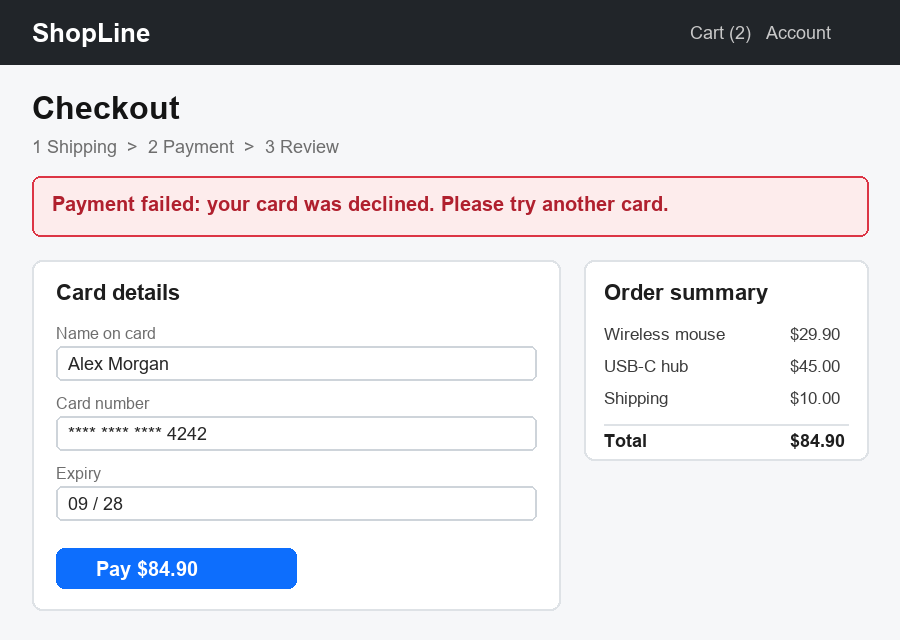
questions = {
    "error": Noul(instructions="Does the screen show an error message?"),
    "step": Choice(instructions="Which checkout step is the user on?",
                   criteria={"shipping": None, "payment": None, "review": None}),
    "next": Choice(instructions="What should the user do next?",
                   criteria={"retry": "Try another card", "wait": "Wait for the order to ship",
                             "nothing": "Nothing, the order went through"}),
}
# vev-9b:  error 0.984
#  step  {"shipping": 0.002, "payment": 0.974, "review": 0.024}
#  next  {"retry": 0.992, "wait": 0.001, "nothing": 0.006}
v0.1 is a research preview, released for non-commercial use under CC BY-NC 4.0.
pip install git+https://github.com/Xiaooolong/vev typesafe-sdk
vev serve --model CountingSheep/vev-9b          # add --revision v0.1.0 to pin this release
from typesafe_sdk import Choice, Noul, TypeSafeClient

client = TypeSafeClient(api_key="local", base_url="http://127.0.0.1:8009")
resp = client.system_one(
    state="Order #4411 still shows 'label created' after 9 days. I need it before Friday.",
    questions={"urgent": Noul(instructions="Is the customer asking for something time-sensitive?")},
)
print(resp.answers["urgent"].noul)
Noul is the API's name for a yes/no question. Images go into the state as {"image": {"url": "data:image/png;base64,..."}}. Needs an NVIDIA GPU with about 19 GB of free memory.
Accuracy on human-labelled data, by the kind of question:
| Kind of question | Example | vev-9b |
|---|---|---|
| Jev-style decisions on text | JevBench public subset | 0.823 |
| The same, on sources the model has not seen | kev transfer-v4 | 0.781 |
| Chinese | judgekit | 0.938 |
| Pairs where a small change flips the answer | nimble | 0.747 |
| UI state in an app screenshot | "Is there a switch or checkbox that is turned on?" / "Is there a text input field?" | 0.923 / 0.955 |
| An image against a written safety policy | the LlavaGuard policy categories | 0.724 |
| A generated image against its prompt | "Does the image show the element 'grass' as the prompt describes?" | 0.703 |
| General questions about a photo | MMBench-EN / POPE / MMStar | 0.902 / 0.897 / 0.674 |
| Bugs in game screenshots | glitch / object clipping (VideoGameQA-Bench) | 0.626 / 0.729 |
The text rows are public benchmarks; the image rows are judgment sets converted from labelled public data. Jev is more accurate on nimble (by 18 points) and kev transfer-v4 (7); JevBench and judgekit are not significantly different. Jev's API takes text only, so the image rows have no Jev comparison. Check Vev on a labelled sample of your own questions before relying on it. Significance tests and the comparison with the base model are in the GitHub README.
from transformers import AutoModelForImageTextToText, AutoProcessor

model = AutoModelForImageTextToText.from_pretrained("CountingSheep/vev-9b", dtype="bfloat16")
processor = AutoProcessor.from_pretrained("CountingSheep/vev-9b")
config.json keeps mtp_num_hidden_layers from the base model, but the multi-token-prediction weights are not
included; reading answers does not use them.
This gives the model only. Vev reads the next-token probabilities of the answer tokens (Yes/No, option letters, level digits) at the end of a fixed prompt, described in spec/systemone-api.md, section 10.
LoRA rank 16 on the language model of Qwen/Qwen3.5-9B, vision tower frozen; 2,500 steps on 100,000 records from 42 public English and Chinese text and image datasets, with a KL term towards the base model on training rows and on the 10,123 unlabeled rows of CountingSheep/vev-anchor-v3. Recipe, library versions and data sources: TRAINING.md.
CC BY-NC 4.0, non-commercial use only, because some training data is licensed for research use (sources and terms
in TRAINING.md). The base model is Apache 2.0; its license is included as LICENSE-Qwen.
All Vev models and data: collection.
@software{vev2026,
  title   = {Vev: Jev-like decision models that can also see images},
  author  = {Wang, Xiaolong},
  year    = {2026},
  url     = {https://github.com/Xiaooolong/vev},
  version = {0.1.1}
}