
Buckets:


| # Stable Diffusion pipelines | |
| Stable Diffusion is a text-to-image latent diffusion model created by the researchers and engineers from [CompVis](https://github.com/CompVis), [Stability AI](https://stability.ai/) and [LAION](https://laion.ai/). Latent diffusion applies the diffusion process over a lower dimensional latent space to reduce memory and compute complexity. This specific type of diffusion model was proposed in [High-Resolution Image Synthesis with Latent Diffusion Models](https://huggingface.co/papers/2112.10752) by Robin Rombach, Andreas Blattmann, Dominik Lorenz, Patrick Esser, Björn Ommer. | |
| Stable Diffusion is trained on 512x512 images from a subset of the LAION-5B dataset. This model uses a frozen CLIP ViT-L/14 text encoder to condition the model on text prompts. With its 860M UNet and 123M text encoder, the model is relatively lightweight and can run on consumer GPUs. | |
| For more details about how Stable Diffusion works and how it differs from the base latent diffusion model, take a look at the Stability AI [announcement](https://stability.ai/blog/stable-diffusion-announcement) and our own [blog post](https://huggingface.co/blog/stable_diffusion#how-does-stable-diffusion-work) for more technical details. | |
| You can find the original codebase for Stable Diffusion v1.0 at [CompVis/stable-diffusion](https://github.com/CompVis/stable-diffusion) and Stable Diffusion v2.0 at [Stability-AI/stablediffusion](https://github.com/Stability-AI/stablediffusion) as well as their original scripts for various tasks. Additional official checkpoints for the different Stable Diffusion versions and tasks can be found on the [CompVis](https://huggingface.co/CompVis) and [Stability AI](https://huggingface.co/stabilityai) Hub organizations. Explore these organizations to find the best checkpoint for your use-case! | |
| The table below summarizes the available Stable Diffusion pipelines, their supported tasks, and an interactive demo: | |
| Pipeline | |
| Supported tasks | |
| 🤗 Space | |
| StableDiffusion | |
| text-to-image | |
| StableDiffusionImg2Img | |
| image-to-image | |
| StableDiffusionInpaint | |
| inpainting | |
| StableDiffusionDepth2Img | |
| depth-to-image | |
| StableDiffusionImageVariation | |
| image variation | |
| StableDiffusionPipelineSafe | |
| filtered text-to-image | |
| StableDiffusion2 | |
| text-to-image, inpainting, depth-to-image, super-resolution | |
| StableDiffusionXL | |
| text-to-image, image-to-image | |
| StableDiffusionLatentUpscale | |
| super-resolution | |
| StableDiffusionUpscale | |
| super-resolution | |
| StableDiffusionLDM3D | |
| text-to-rgb, text-to-depth, text-to-pano | |
| StableDiffusionUpscaleLDM3D | |
| ldm3d super-resolution | |
| ## Tips | |
| To help you get the most out of the Stable Diffusion pipelines, here are a few tips for improving performance and usability. These tips are applicable to all Stable Diffusion pipelines. | |
| ### Explore tradeoff between speed and quality | |
| [StableDiffusionPipeline](/docs/diffusers/main/en/api/pipelines/stable_diffusion/text2img#diffusers.StableDiffusionPipeline) uses the [PNDMScheduler](/docs/diffusers/main/en/api/schedulers/pndm#diffusers.PNDMScheduler) by default, but 🤗 Diffusers provides many other schedulers (some of which are faster or output better quality) that are compatible. For example, if you want to use the [EulerDiscreteScheduler](/docs/diffusers/main/en/api/schedulers/euler#diffusers.EulerDiscreteScheduler) instead of the default: | |
| ```py | |
| from diffusers import StableDiffusionPipeline, EulerDiscreteScheduler | |
| pipeline = StableDiffusionPipeline.from_pretrained("CompVis/stable-diffusion-v1-4") | |
| pipeline.scheduler = EulerDiscreteScheduler.from_config(pipeline.scheduler.config) | |
| # or | |
| euler_scheduler = EulerDiscreteScheduler.from_pretrained("CompVis/stable-diffusion-v1-4", subfolder="scheduler") | |
| pipeline = StableDiffusionPipeline.from_pretrained("CompVis/stable-diffusion-v1-4", scheduler=euler_scheduler) | |
| ``` | |
| ### Reuse pipeline components to save memory | |
| To save memory and use the same components across multiple pipelines, use the `.components` method to avoid loading weights into RAM more than once. | |
| ```py | |
| from diffusers import ( | |
| StableDiffusionPipeline, | |
| StableDiffusionImg2ImgPipeline, | |
| StableDiffusionInpaintPipeline, | |
| ) | |
| text2img = StableDiffusionPipeline.from_pretrained("CompVis/stable-diffusion-v1-4") | |
| img2img = StableDiffusionImg2ImgPipeline(**text2img.components) | |
| inpaint = StableDiffusionInpaintPipeline(**text2img.components) | |
| # now you can use text2img(...), img2img(...), inpaint(...) just like the call methods of each respective pipeline | |
| ``` | |
| ### Create web demos using `gradio` | |
| The Stable Diffusion pipelines are automatically supported in [Gradio](https://github.com/gradio-app/gradio/), a library that makes creating beautiful and user-friendly machine learning apps on the web a breeze. First, make sure you have Gradio installed: | |
| ```sh | |
| pip install -U gradio | |
| ``` | |
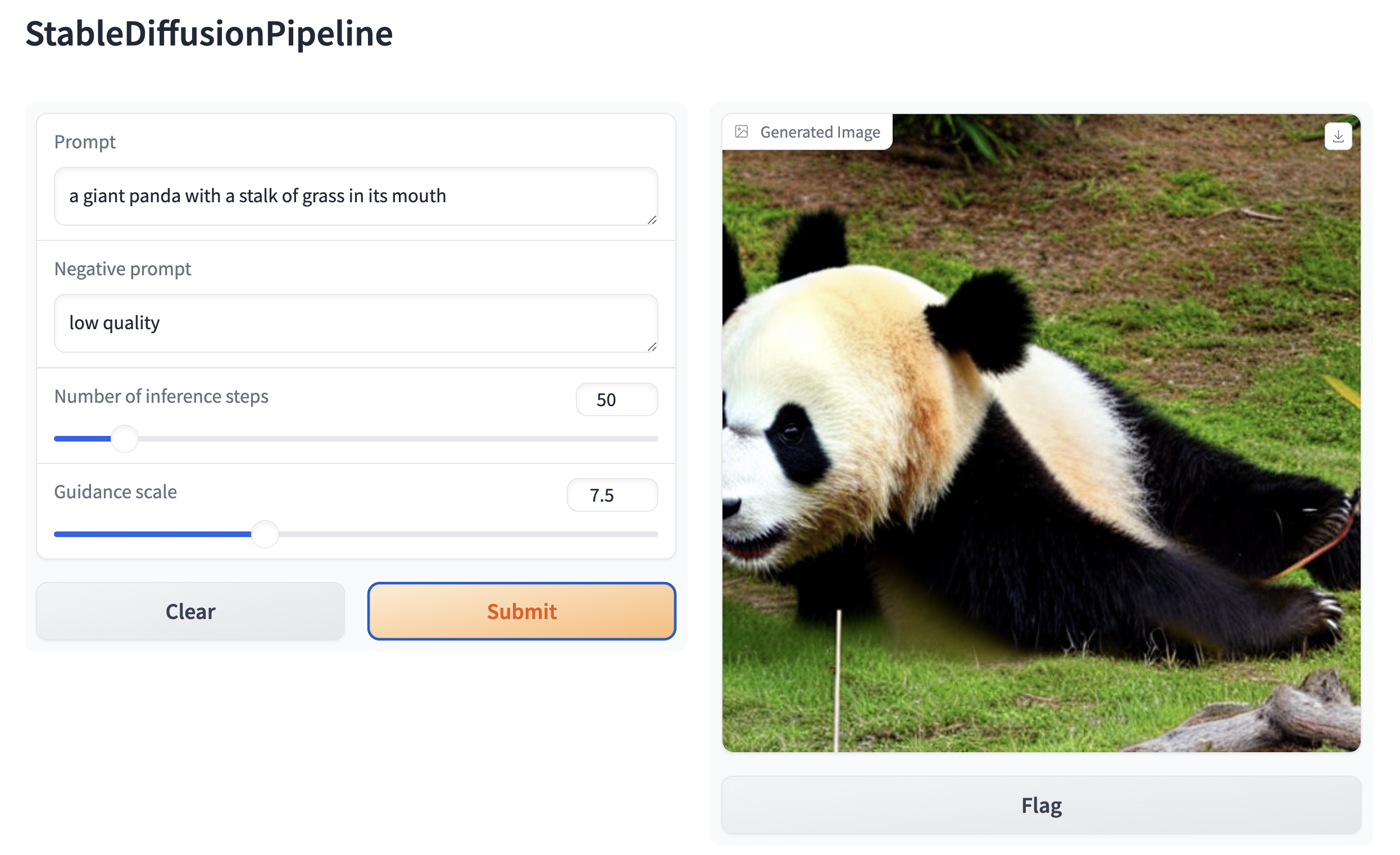
| Then, create a web demo around any Stable Diffusion-based pipeline. For example, you can create an image generation pipeline in a single line of code with Gradio's [`Interface.from_pipeline`](https://www.gradio.app/docs/interface#interface-from-pipeline) function: | |
| ```py | |
| from diffusers import StableDiffusionPipeline | |
| import gradio as gr | |
| pipe = StableDiffusionPipeline.from_pretrained("CompVis/stable-diffusion-v1-4") | |
| gr.Interface.from_pipeline(pipe).launch() | |
| ``` | |
| which opens an intuitive drag-and-drop interface in your browser: | |
|  | |
| Similarly, you could create a demo for an image-to-image pipeline with: | |
| ```py | |
| from diffusers import StableDiffusionImg2ImgPipeline | |
| import gradio as gr | |
| pipe = StableDiffusionImg2ImgPipeline.from_pretrained("stable-diffusion-v1-5/stable-diffusion-v1-5") | |
| gr.Interface.from_pipeline(pipe).launch() | |
| ``` | |
| By default, the web demo runs on a local server. If you'd like to share it with others, you can generate a temporary public | |
| link by setting `share=True` in `launch()`. Or, you can host your demo on [Hugging Face Spaces](https://huggingface.co/spaces)https://huggingface.co/spaces for a permanent link. | |
Xet Storage Details
- Size:
- 7.3 kB
- Xet hash:
- 8b7377057075acadf237b450cb2a37491fa2cacd4777333e3ba711bcaa20bb80
·
Xet efficiently stores files, intelligently splitting them into unique chunks and accelerating uploads and downloads. More info.