Instructions to use QuantFactory/Datarus-R1-14B-preview-GGUF with libraries, inference providers, notebooks, and local apps. Follow these links to get started.
- Libraries
- Transformers
How to use QuantFactory/Datarus-R1-14B-preview-GGUF with Transformers:
# Use a pipeline as a high-level helper from transformers import pipeline pipe = pipeline("text-generation", model="QuantFactory/Datarus-R1-14B-preview-GGUF") messages = [ {"role": "user", "content": "Who are you?"}, ] pipe(messages)# Load model directly from transformers import AutoModel model = AutoModel.from_pretrained("QuantFactory/Datarus-R1-14B-preview-GGUF", dtype="auto") - llama-cpp-python
How to use QuantFactory/Datarus-R1-14B-preview-GGUF with llama-cpp-python:
# !pip install llama-cpp-python from llama_cpp import Llama llm = Llama.from_pretrained( repo_id="QuantFactory/Datarus-R1-14B-preview-GGUF", filename="Datarus-R1-14B-preview.Q4_0.gguf", )
llm.create_chat_completion( messages = [ { "role": "user", "content": "What is the capital of France?" } ] ) - Notebooks
- Google Colab
- Kaggle
- Local Apps
- llama.cpp
How to use QuantFactory/Datarus-R1-14B-preview-GGUF with llama.cpp:
Install from brew
brew install llama.cpp # Start a local OpenAI-compatible server with a web UI: llama-server -hf QuantFactory/Datarus-R1-14B-preview-GGUF:Q4_K_M # Run inference directly in the terminal: llama-cli -hf QuantFactory/Datarus-R1-14B-preview-GGUF:Q4_K_M
Install from WinGet (Windows)
winget install llama.cpp # Start a local OpenAI-compatible server with a web UI: llama-server -hf QuantFactory/Datarus-R1-14B-preview-GGUF:Q4_K_M # Run inference directly in the terminal: llama-cli -hf QuantFactory/Datarus-R1-14B-preview-GGUF:Q4_K_M
Use pre-built binary
# Download pre-built binary from: # https://github.com/ggerganov/llama.cpp/releases # Start a local OpenAI-compatible server with a web UI: ./llama-server -hf QuantFactory/Datarus-R1-14B-preview-GGUF:Q4_K_M # Run inference directly in the terminal: ./llama-cli -hf QuantFactory/Datarus-R1-14B-preview-GGUF:Q4_K_M
Build from source code
git clone https://github.com/ggerganov/llama.cpp.git cd llama.cpp cmake -B build cmake --build build -j --target llama-server llama-cli # Start a local OpenAI-compatible server with a web UI: ./build/bin/llama-server -hf QuantFactory/Datarus-R1-14B-preview-GGUF:Q4_K_M # Run inference directly in the terminal: ./build/bin/llama-cli -hf QuantFactory/Datarus-R1-14B-preview-GGUF:Q4_K_M
Use Docker
docker model run hf.co/QuantFactory/Datarus-R1-14B-preview-GGUF:Q4_K_M
- LM Studio
- Jan
- vLLM
How to use QuantFactory/Datarus-R1-14B-preview-GGUF with vLLM:
Install from pip and serve model
# Install vLLM from pip: pip install vllm # Start the vLLM server: vllm serve "QuantFactory/Datarus-R1-14B-preview-GGUF" # Call the server using curl (OpenAI-compatible API): curl -X POST "http://localhost:8000/v1/chat/completions" \ -H "Content-Type: application/json" \ --data '{ "model": "QuantFactory/Datarus-R1-14B-preview-GGUF", "messages": [ { "role": "user", "content": "What is the capital of France?" } ] }'Use Docker
docker model run hf.co/QuantFactory/Datarus-R1-14B-preview-GGUF:Q4_K_M
- SGLang
How to use QuantFactory/Datarus-R1-14B-preview-GGUF with SGLang:
Install from pip and serve model
# Install SGLang from pip: pip install sglang # Start the SGLang server: python3 -m sglang.launch_server \ --model-path "QuantFactory/Datarus-R1-14B-preview-GGUF" \ --host 0.0.0.0 \ --port 30000 # Call the server using curl (OpenAI-compatible API): curl -X POST "http://localhost:30000/v1/chat/completions" \ -H "Content-Type: application/json" \ --data '{ "model": "QuantFactory/Datarus-R1-14B-preview-GGUF", "messages": [ { "role": "user", "content": "What is the capital of France?" } ] }'Use Docker images
docker run --gpus all \ --shm-size 32g \ -p 30000:30000 \ -v ~/.cache/huggingface:/root/.cache/huggingface \ --env "HF_TOKEN=<secret>" \ --ipc=host \ lmsysorg/sglang:latest \ python3 -m sglang.launch_server \ --model-path "QuantFactory/Datarus-R1-14B-preview-GGUF" \ --host 0.0.0.0 \ --port 30000 # Call the server using curl (OpenAI-compatible API): curl -X POST "http://localhost:30000/v1/chat/completions" \ -H "Content-Type: application/json" \ --data '{ "model": "QuantFactory/Datarus-R1-14B-preview-GGUF", "messages": [ { "role": "user", "content": "What is the capital of France?" } ] }' - Ollama
How to use QuantFactory/Datarus-R1-14B-preview-GGUF with Ollama:
ollama run hf.co/QuantFactory/Datarus-R1-14B-preview-GGUF:Q4_K_M
- Unsloth Studio new
How to use QuantFactory/Datarus-R1-14B-preview-GGUF with Unsloth Studio:
Install Unsloth Studio (macOS, Linux, WSL)
curl -fsSL https://unsloth.ai/install.sh | sh # Run unsloth studio unsloth studio -H 0.0.0.0 -p 8888 # Then open http://localhost:8888 in your browser # Search for QuantFactory/Datarus-R1-14B-preview-GGUF to start chatting
Install Unsloth Studio (Windows)
irm https://unsloth.ai/install.ps1 | iex # Run unsloth studio unsloth studio -H 0.0.0.0 -p 8888 # Then open http://localhost:8888 in your browser # Search for QuantFactory/Datarus-R1-14B-preview-GGUF to start chatting
Using HuggingFace Spaces for Unsloth
# No setup required # Open https://huggingface.co/spaces/unsloth/studio in your browser # Search for QuantFactory/Datarus-R1-14B-preview-GGUF to start chatting
- Docker Model Runner
How to use QuantFactory/Datarus-R1-14B-preview-GGUF with Docker Model Runner:
docker model run hf.co/QuantFactory/Datarus-R1-14B-preview-GGUF:Q4_K_M
- Lemonade
How to use QuantFactory/Datarus-R1-14B-preview-GGUF with Lemonade:
Pull the model
# Download Lemonade from https://lemonade-server.ai/ lemonade pull QuantFactory/Datarus-R1-14B-preview-GGUF:Q4_K_M
Run and chat with the model
lemonade run user.Datarus-R1-14B-preview-GGUF-Q4_K_M
List all available models
lemonade list
Install from WinGet (Windows)
winget install llama.cpp
# Start a local OpenAI-compatible server with a web UI:
llama-server -hf QuantFactory/Datarus-R1-14B-preview-GGUF:# Run inference directly in the terminal:
llama-cli -hf QuantFactory/Datarus-R1-14B-preview-GGUF:Use pre-built binary
# Download pre-built binary from:
# https://github.com/ggerganov/llama.cpp/releases# Start a local OpenAI-compatible server with a web UI:
./llama-server -hf QuantFactory/Datarus-R1-14B-preview-GGUF:# Run inference directly in the terminal:
./llama-cli -hf QuantFactory/Datarus-R1-14B-preview-GGUF:Build from source code
git clone https://github.com/ggerganov/llama.cpp.git
cd llama.cpp
cmake -B build
cmake --build build -j --target llama-server llama-cli# Start a local OpenAI-compatible server with a web UI:
./build/bin/llama-server -hf QuantFactory/Datarus-R1-14B-preview-GGUF:# Run inference directly in the terminal:
./build/bin/llama-cli -hf QuantFactory/Datarus-R1-14B-preview-GGUF:Use Docker
docker model run hf.co/QuantFactory/Datarus-R1-14B-preview-GGUF:QuantFactory/Datarus-R1-14B-preview-GGUF
This is quantized version of DatarusAI/Datarus-R1-14B-preview created using llama.cpp

Original Model Card
Datarus-R1-14B-preview
🚀 Overview
Datarus-R1-14B-Preview is a 14B-parameter open-weights language model fine-tuned from Qwen2.5-14B-Instruct, designed to act as a virtual data analyst and graduate-level problem solver. Unlike traditional models trained on isolated Q&A pairs, Datarus learns from complete analytical trajectories—including reasoning steps, code execution, error traces, self-corrections, and final conclusions—all captured in a ReAct-style notebook format.
Key Highlights
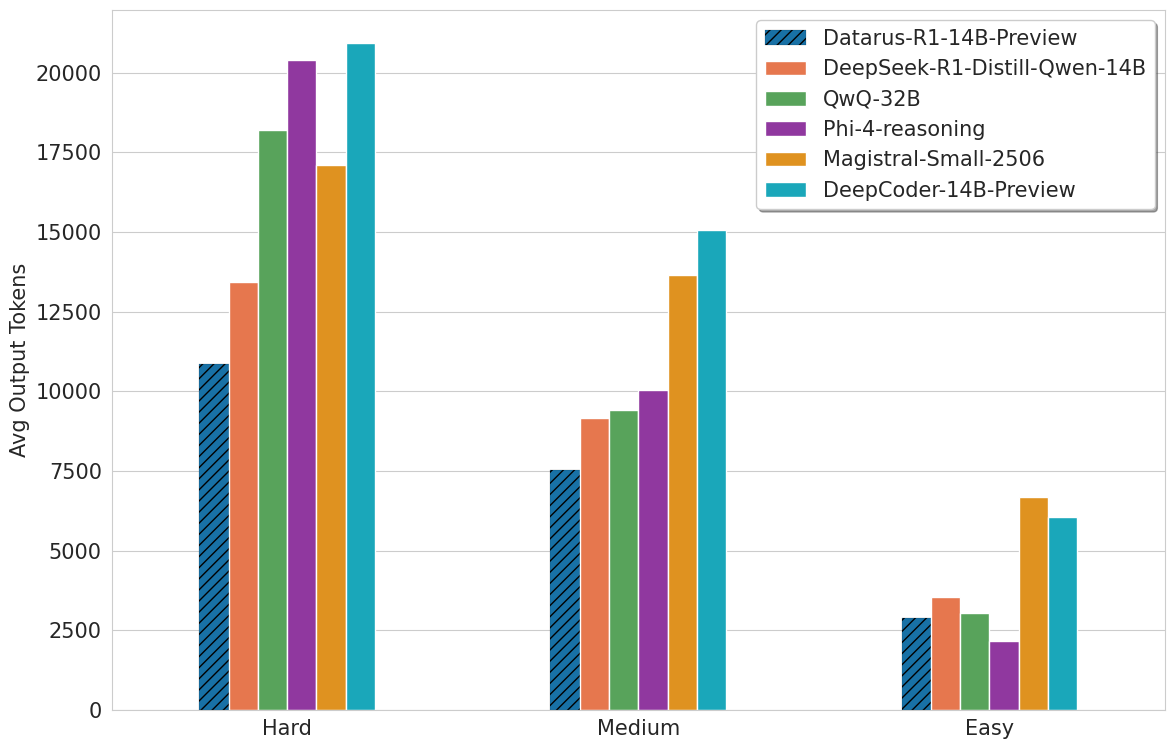
- 🎯 State-of-the-art efficiency: Surpasses similar-sized models and competes with 32B+ models while using 18-49% fewer tokens
- 🔄 Dual reasoning interfaces: Supports both Agentic (ReAct) mode for interactive analysis and Reflection (CoT) mode for concise documentation
- 📊 Superior performance: Achieves up to 30% higher accuracy on AIME 2024/2025 and LiveCodeBench
- 💡 "AHA-moment" pattern: Exhibits efficient hypothesis refinement in 1-2 iterations, avoiding circular reasoning loops
🔗 Quick Links
- 🌐 Website: https://datarus.ai
- 💬 Try the Demo: https://chat.datarus.ai
- 🛠️ Jupyter Agent: GitHub Repository
- 📄 Paper: Datarus-R1: An Adaptive Multi-Step Reasoning LLM
📊 Performance
Benchmark Results
| Benchmark | Datarus-R1-14B-Preview | QwQ-32B | Phi-4-reasoning | DeepSeek-R1-Distill-14B |
|---|---|---|---|---|
| LiveCodeBench v6 | 57.7 | 56.6 | 52.6 | 48.6 |
| AIME 2024 | 70.1 | 76.2 | 74.6* | - |
| AIME 2025 | 66.2 | 66.2 | 63.1* | - |
| GPQA Diamond | 62.1 | 60.1 | 55.0 | 58.6 |
*Reported values from official papers
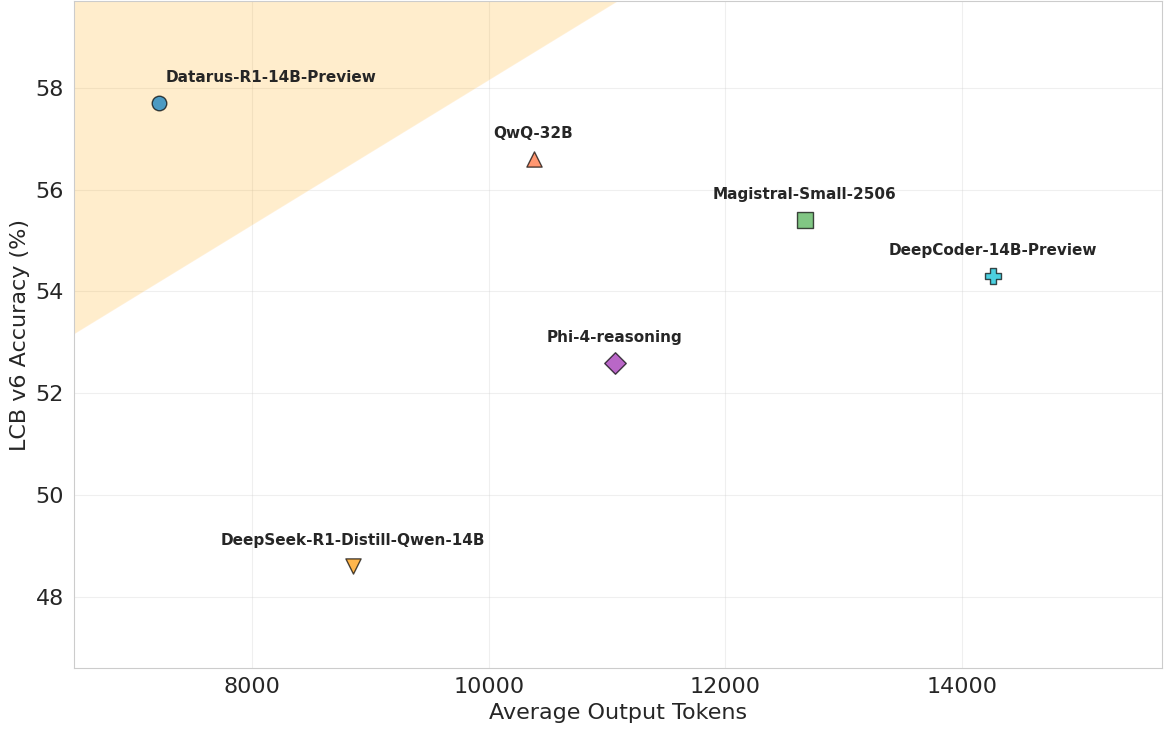
Token Efficiency and Performance
🎯 Model Card
Model Details
- Model Type: Language Model for Reasoning and Data Analysis
- Parameters: 14.8B
- Training Data: 144,000 synthetic analytical trajectories across finance, medicine, numerical analysis, and other quantitative domains + A curated collection of reasoning datasets.
- Language: English
- License: Apache 2.0
Intended Use
Primary Use Cases
- Data Analysis: Automated data exploration, statistical analysis, and visualization
- Mathematical Problem Solving: Graduate-level mathematics including AIME-level problems
- Code Generation: Creating analytical scripts and solving programming challenges
- Scientific Reasoning: Complex problem-solving in physics, chemistry, and other sciences
- Interactive Notebooks: Building complete analysis notebooks with iterative refinement
Dual Mode Usage
Agentic Mode (for interactive analysis)
- Use
<step>,<thought>,<action>,<action_input>,<observation>tags - Enables iterative code execution and refinement
- Best for data analysis, simulations, and exploratory tasks
Reflection Mode (for documentation)
- Use
<think>and<answer>tags - Produces compact, self-contained reasoning chains
- Best for mathematical proofs, explanations, and reports
📚 Citation
@article{benchaliah2025datarus,
title={Datarus-R1: An Adaptive Multi-Step Reasoning LLM for Automated Data Analysis},
author={Ben Chaliah, Ayoub and Dellagi, Hela},
journal={arXiv preprint arXiv:2508.13382},
year={2025}
}
🤝 Contributing
We welcome contributions! Please see our GitHub repository for:
- Bug reports and feature requests
- Pull requests
- Discussion forums
📄 License
This model is released under the Apache 2.0 License.
🙏 Acknowledgments
We thank the Qwen team for the excellent base model and the open-source community for their valuable contributions.
📧 Contact
- Email: ayoub1benchaliah@gmail.com, hela.dellagi@outlook.com
- Website: https://datarus.ai
- Demo: https://chat.datarus.ai
⭐ Support
If you find this model and Agent pipeline useful, please consider Like/Star! Your support helps us continue improving the project.
Found a bug or have a feature request? Please open an issue on GitHub.
Made with ❤️ by the Datarus Team from Paris
- Downloads last month
- 25
4-bit
5-bit
6-bit
8-bit
Model tree for QuantFactory/Datarus-R1-14B-preview-GGUF
Base model
Qwen/Qwen2.5-14B
Install from brew
# Start a local OpenAI-compatible server with a web UI: llama-server -hf QuantFactory/Datarus-R1-14B-preview-GGUF:# Run inference directly in the terminal: llama-cli -hf QuantFactory/Datarus-R1-14B-preview-GGUF: