
Spaces:
Sleeping

Sleeping
File size: 11,531 Bytes
da6abe9 03471c4 a4d108a da6abe9 |
1 2 3 4 5 6 7 8 9 10 11 12 13 14 15 16 17 18 19 20 21 22 23 24 25 26 27 28 29 30 31 32 33 34 35 36 37 38 39 40 41 42 43 44 45 46 47 48 49 50 51 52 53 54 55 56 57 58 59 60 61 62 63 64 65 66 67 68 69 70 71 72 73 74 75 76 77 78 79 80 81 82 83 84 85 86 87 88 89 90 91 92 93 94 95 96 97 98 99 100 101 102 103 104 105 106 107 108 109 110 111 112 113 114 115 116 117 118 119 120 121 122 123 124 125 126 127 128 129 130 131 132 133 134 135 136 137 138 139 140 141 142 143 144 145 146 147 148 149 150 151 152 153 154 155 156 157 158 159 160 161 162 163 164 165 166 167 168 169 170 171 172 173 174 175 176 177 178 179 180 181 182 183 184 185 186 187 188 189 190 191 192 193 194 195 196 197 198 199 200 201 202 203 204 205 206 207 208 209 210 211 212 213 214 215 216 217 218 219 220 221 222 223 224 225 226 227 228 229 230 231 232 233 234 235 236 237 238 239 240 241 |
# -*- coding: utf-8 -*-
"""Build a Retrieval Augmented Generation (RAG) App.ipynb
Automatically generated by Colab.
Original file is located at
https://colab.research.google.com/drive/1S2hX-KUWMKmFWGK-Ae9qyYCtcwseOgH-
## Building a Retrieval Augmented Generation (RAG) App
### Introduction to RAG
**Retrieval Augmented Generation (RAG)** is a powerful technique for building sophisticated question-answering (Q&A) applications using Large Language Models (LLMs). These applications can answer questions about specific source information by augmenting the knowledge of LLMs with additional, relevant data.
### Purpose of RAG
- **Enhancing LLMs**: LLMs are trained on public data up to a specific cutoff date. RAG enables the integration of private or more recent data, improving the model's ability to reason about this new information.
- **Application**: Used to create Q&A chatbots that can handle queries about specific data sources.
### Components of a RAG Application
1. **Indexing**
- **Loading Data**: Ingesting data from a source using DocumentLoaders.
- **Splitting Text**: Breaking large documents into smaller chunks using text splitters. This makes the data easier to index and fit within the model's context window.
- **Storing Data**: Indexing and storing the text chunks using a VectorStore and an Embeddings model.
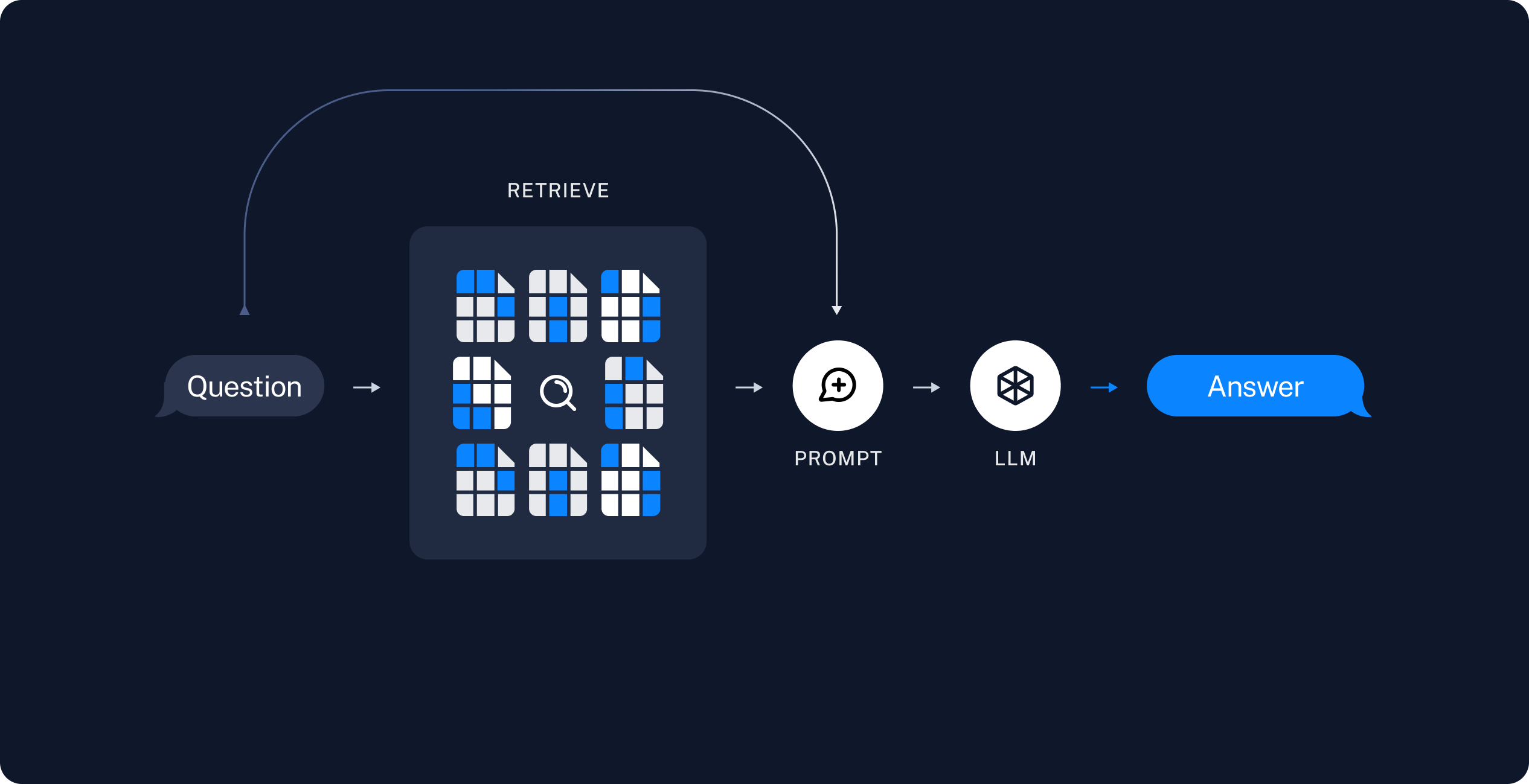
2. **Retrieval and Generation**
- **Retrieving Data**: Using a Retriever to fetch relevant data chunks based on the user’s query.
- **Generating Answers**: Using a ChatModel or LLM to produce an answer by combining the user’s question with the retrieved data.
### Workflow of a RAG Application
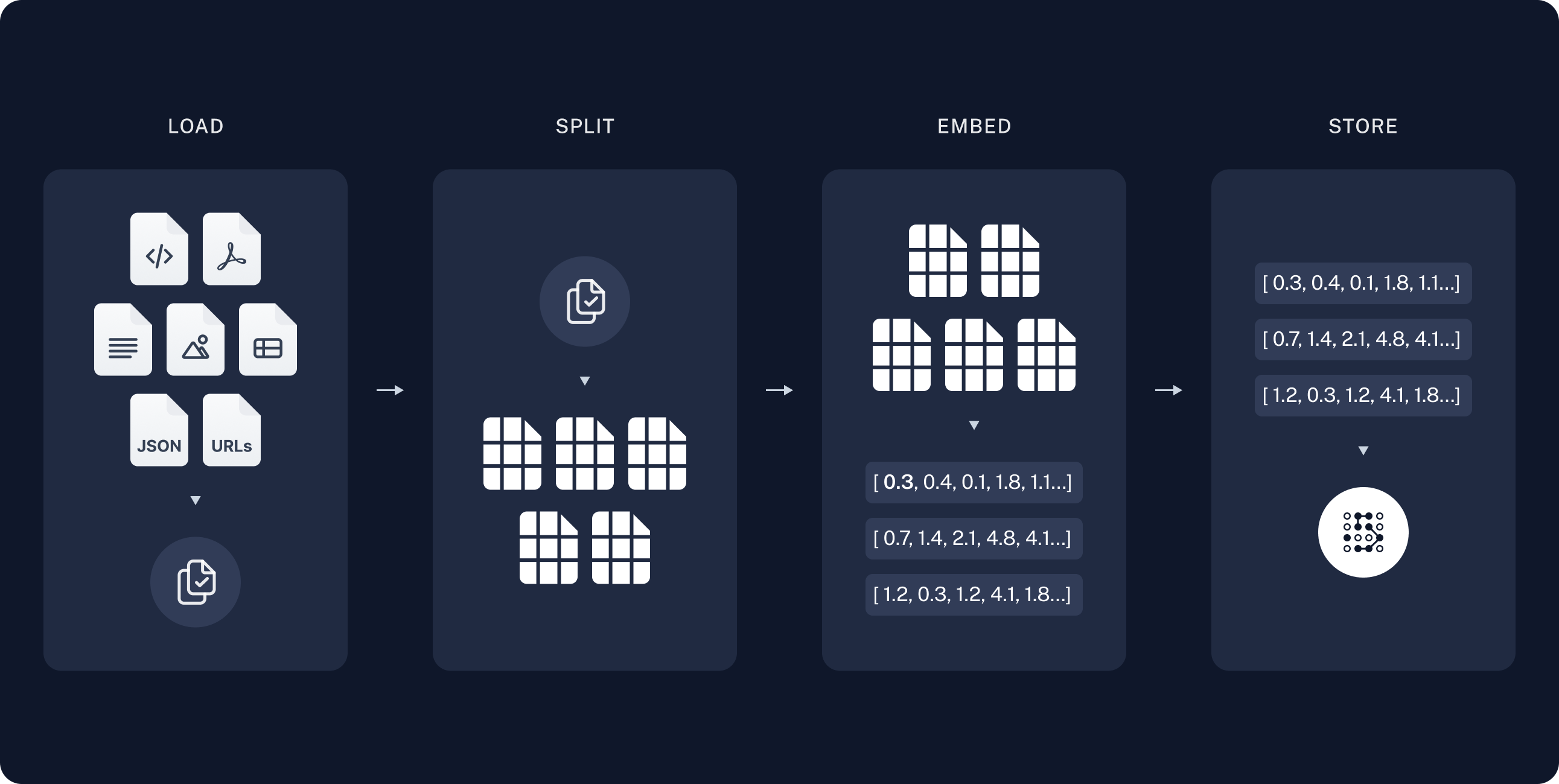
1. **Indexing Phase**
- **Load**: Import data using DocumentLoaders.
- **Split**: Use text splitters to divide large documents into manageable chunks.
- **Store**: Index and store these chunks in a VectorStore for efficient retrieval.
- **Diagram**: Visual representation of the indexing process shows data loading, splitting, and storing in an indexed format.
2. **Retrieval and Generation Phase**
- **Retrieve**: Upon receiving a user query, the system retrieves the most relevant chunks of data from the VectorStore.
- **Generate**: The retrieved data, combined with the user’s query, is used by the LLM to generate a coherent and relevant answer.
### Tools and Technologies
- **LangChain**: Provides components to build Q&A applications and RAG systems.
- **DocumentLoaders**: For loading data into the system.
- **Text Splitters**: For breaking down documents into smaller chunks.
- **VectorStore**: For storing and indexing data chunks.
- **Embeddings Model**: To transform data chunks into searchable vector representations.
- **Retriever**: To fetch relevant data chunks based on user queries.
- **ChatModel/LLM**: To generate answers using the retrieved data and user query.
### Example Application Workflow
1. **Data Ingestion**: Load a large text document using DocumentLoaders.
2. **Data Preparation**: Split the document into smaller, manageable chunks with text splitters.
3. **Data Indexing**: Store these chunks in a VectorStore, indexed using an Embeddings model.
4. **Query Processing**:
- When a user submits a query, the Retriever searches the VectorStore for relevant data chunks.
- The retrieved data is combined with the user’s query and fed into a ChatModel or LLM.
- The model generates and returns a relevant answer to the user.
### Advanced Techniques and Resources
- **LangSmith**: A tool to trace and understand the application, becoming more valuable as the application's complexity increases.
- **RAG over Structured Data**: For those interested in applying RAG to structured data like SQL databases, that can also possible using LangChain.
let's dive into hands-on coding!
## Installation & setup
"""
# !pip install -q langchain
"""## LangSmith
When building applications with LangChain, multiple steps and LLM calls often become complex. To effectively inspect and understand the internal workings of your chain or agent, LangSmith is the best tool for the job.
After langsmith signup, make sure to set your environment variables to start logging traces:
"""
import os
# from google.colab import userdata
from dotenv import load_dotenv
load_dotenv()
os.environ["LANGCHAIN_TRACING_V2"] = "true"
os.environ["LANGCHAIN_API_KEY"] = os.getenv("LANGCHAIN_API_KEY")
os.environ["HUGGINGFACEHUB_API_TOKEN"] = os.getenv("HUGGINGFACEHUB_API_TOKEN")
"""## 1. Indexing: Load
In this guide we’ll build a QA app over python.org FAQ's website(https://docs.python.org/3/faq/index.html).
- We need tp first load the FAQ's from the python faq's url for this we can use the document loaded which loaded in data from source and return a list of documents. A document is an object with some page_content(str) and metadata (dict)
- In this case we use the WebBasedloader which users the urllib to load HTML from web URLs and BeautifulSoup to parse it to text.
- In this case only HTML tags with class `body` from list of urls are relevent, so we'll remove all other=.
"""
# !pip install -q bs4
# !pip install -q langchain_community
import bs4
from langchain_community.document_loaders import WebBaseLoader
web_paths = ("https://docs.python.org/3/faq/general.html",
"https://docs.python.org/3/faq/programming.html",
"https://docs.python.org/3/faq/design.html",
"https://docs.python.org/3/faq/library.html",
"https://docs.python.org/3/faq/extending.html",
"https://docs.python.org/3/faq/windows.html",
"https://docs.python.org/3/faq/gui.html",
"https://docs.python.org/3/faq/installed.html")
bs4_strainer = bs4.SoupStrainer(class_=("body"))
loader = WebBaseLoader(web_path=web_paths,
bs_kwargs={"parse_only": bs4_strainer}
)
docs = loader.load()
# check last url content
len(docs[0].page_content)
docs[0].page_content
"""# 2. Indexing: Split
* Our loaded document exceeds 18,714 characters, which is too long for many models' context windows. To manage this, we'll split the document into chunks for embedding and vector storage. This approach helps retrieve the most relevant parts of the blog post at runtime.
* We'll divide the document into 1,000-character chunks with a 200-character overlap to maintain important context. Using `RecursiveCharacterTextSplitter`, we split the document with common separators like new lines until each chunk is the correct size. This splitter is ideal for generic text use cases.
* By setting `add_start_index=True`, we preserve the start index of each chunk as the "start_index" metadata attribute.
"""
from langchain.text_splitter import RecursiveCharacterTextSplitter
text_splitter = RecursiveCharacterTextSplitter(chunk_size=1000, chunk_overlap=200, add_start_index=True)
all_splits = text_splitter.split_documents(docs)
print(len(all_splits))
print(len(all_splits[0].page_content))
all_splits[240].metadata
"""# 3. Indexing: Store
To index our 249 text chunks for runtime search, we embed each document split and insert these embeddings into a vector database (vector store). For searching, we embed the query and perform a "similarity" search to find the splits with the most similar embeddings, often using cosine similarity. This process can be done in a single command using the Chroma vector store and HuggingFaceHubEmbeddings `sentence-transformers/all-mpnet-base-v2` model.
"""
# !pip install -q chromadb
# now perform the embedding on top of this splits to store in a vector db
from langchain.embeddings import HuggingFaceHubEmbeddings
from langchain.vectorstores import Chroma
embeddings = HuggingFaceHubEmbeddings(repo_id="sentence-transformers/all-mpnet-base-v2")
vectorstore = Chroma.from_documents(documents=all_splits, embedding=embeddings)
"""# 4. Retrieval and Generation: Retrieve
Now let’s write the application logic for a simple app that takes a user question, searches for relevant documents, passes these documents and the question to a model, and returns an answer.
First, we define the logic for searching documents using LangChain's Retriever interface, which wraps an index to return relevant documents from a string query.
The most common Retriever is the VectorStoreRetriever, which uses vector store similarity search for retrieval. Any VectorStore can be turned into a Retriever with `VectorStore.as_retriever()`.
"""
retriever = vectorstore.as_retriever(search_type="similarity", search_kwargs={"k": 6})
retrieved_docs = retriever.invoke("How do I freeze Tkinter applications?")
len(retrieved_docs)
print(retrieved_docs[0].page_content)
"""# 5. Retrieval and Generation: Generate
Let’s put it all together into a chain that takes a question, retrieves relevant documents, constructs a prompt, passes that to a model, and parses the output.
We’ll use the Mistral-7B-Instruct-v0.3 HuggingFaceHub model, but any LangChain LLM or ChatModel could be substituted in.
"""
# !pip install -q huggingface_hub
from langchain.llms import HuggingFaceEndpoint
repo_id = "mistralai/Mistral-7B-Instruct-v0.3"
llm = HuggingFaceEndpoint(repo_id=repo_id,
task="text-generation",
temperature=0.3, max_new_tokens=200,
return_full_text=False,
huggingfacehub_api_token=os.environ["HUGGINGFACEHUB_API_TOKEN"]
)
# Customized prompt
from langchain_core.output_parsers import StrOutputParser
from langchain.prompts import PromptTemplate
from langchain.schema.runnable import RunnablePassthrough
from langchain.callbacks.streaming_stdout import StreamingStdOutCallbackHandler
parser = StrOutputParser()
template = """Use the following pieces of context to answer the question at the end.
Only answer the question from the context don't generate any additional infrormation.
If you don't get enough information from the context, just say that "I don't have information about this question". I can only answer questions from the source url https://docs.python.org/3/faq/index.html.
Always say "thanks for asking!" at the end of the answer.
{context}
Question: {question}
Helpful Answer:"""
custom_rag_prompt = PromptTemplate.from_template(template)
# Extract the page_content from the Document object
def extract_page_content(docs):
return "\n\n".join(doc.page_content for doc in docs)
rag_chain = (
{"context": retriever | extract_page_content, "question": RunnablePassthrough()}
| custom_rag_prompt
| llm
| parser
)
rag_chain.invoke("How do I freeze Tkinter applications?")
"""### Chain Construction and Prompt Formatting flow
The input to the prompt is expected to be a dictionary with keys `"context"` and `"question"`. The initial chain element processes these:
- **retriever | format_docs**: Retrieves and formats documents from the question, creating Document objects and strings.
- **RunnablePassthrough()**: Passes the input question unchanged.
- Calling `chain.invoke(question)` formats the prompt for inference. The final steps, `llm` and `StrOutputParser()`, run the inference and extract the string content. You can analyze the chain's steps using LangSmith trace.
"""
|