
Spaces:
Sleeping

Sleeping
File size: 43,362 Bytes
da6abe9 |
1 2 3 4 5 6 7 8 9 10 11 12 13 14 15 16 17 18 19 20 21 22 23 24 25 26 27 28 29 30 31 32 33 34 35 36 37 38 39 40 41 42 43 44 45 46 47 48 49 50 51 52 53 54 55 56 57 58 59 60 61 62 63 64 65 66 67 68 69 70 71 72 73 74 75 76 77 78 79 80 81 82 83 84 85 86 87 88 89 90 91 92 93 94 95 96 97 98 99 100 101 102 103 104 105 106 107 108 109 110 111 112 113 114 115 116 117 118 119 120 121 122 123 124 125 126 127 128 129 130 131 132 133 134 135 136 137 138 139 140 141 142 143 144 145 146 147 148 149 150 151 152 153 154 155 156 157 158 159 160 161 162 163 164 165 166 167 168 169 170 171 172 173 174 175 176 177 178 179 180 181 182 183 184 185 186 187 188 189 190 191 192 193 194 195 196 197 198 199 200 201 202 203 204 205 206 207 208 209 210 211 212 213 214 215 216 217 218 219 220 221 222 223 224 225 226 227 228 229 230 231 232 233 234 235 236 237 238 239 240 241 242 243 244 245 246 247 248 249 250 251 252 253 254 255 256 257 258 259 260 261 262 263 264 265 266 267 268 269 270 271 272 273 274 275 276 277 278 279 280 281 282 283 284 285 286 287 288 289 290 291 292 293 294 295 296 297 298 299 300 301 302 303 304 305 306 307 308 309 310 311 312 313 314 315 316 317 318 319 320 321 322 323 324 325 326 327 328 329 330 331 332 333 334 335 336 337 338 339 340 341 342 343 344 345 346 347 348 349 350 351 352 353 354 355 356 357 358 359 360 361 362 363 364 365 366 367 368 369 370 371 372 373 374 375 376 377 378 379 380 381 382 383 384 385 386 387 388 389 390 391 392 393 394 395 396 397 398 399 400 401 402 403 404 405 406 407 408 409 410 411 412 413 414 415 416 417 418 419 420 421 422 423 424 425 426 427 428 429 430 431 432 433 434 435 436 437 438 439 440 441 442 443 444 445 446 447 448 449 450 451 452 453 454 455 456 457 458 459 460 461 462 463 464 465 466 467 468 469 470 471 472 473 474 475 476 477 478 479 480 481 482 483 484 485 486 487 488 489 490 491 492 493 494 495 496 497 498 499 500 501 502 503 504 505 506 507 508 509 510 511 512 513 514 515 516 517 518 519 520 521 522 523 524 525 526 527 528 529 530 531 532 533 534 535 536 537 538 539 540 541 542 543 544 545 546 547 548 549 550 551 552 553 554 555 556 557 558 559 560 561 562 563 564 565 566 567 568 569 570 571 572 573 574 575 576 577 578 579 580 581 582 583 584 585 586 587 588 589 590 591 592 593 594 595 596 597 598 599 600 601 602 603 604 605 606 607 608 609 610 611 612 613 614 615 616 617 618 619 |
{
"nbformat": 4,
"nbformat_minor": 0,
"metadata": {
"colab": {
"provenance": []
},
"kernelspec": {
"name": "python3",
"display_name": "Python 3"
},
"language_info": {
"name": "python"
}
},
"cells": [
{
"cell_type": "markdown",
"source": [
"## Building a Retrieval Augmented Generation (RAG) App\n",
"\n",
"### Introduction to RAG\n",
"**Retrieval Augmented Generation (RAG)** is a powerful technique for building sophisticated question-answering (Q&A) applications using Large Language Models (LLMs). These applications can answer questions about specific source information by augmenting the knowledge of LLMs with additional, relevant data.\n",
"\n",
"### Purpose of RAG\n",
"- **Enhancing LLMs**: LLMs are trained on public data up to a specific cutoff date. RAG enables the integration of private or more recent data, improving the model's ability to reason about this new information.\n",
"- **Application**: Used to create Q&A chatbots that can handle queries about specific data sources.\n",
"\n",
"### Components of a RAG Application\n",
"1. **Indexing**\n",
" - **Loading Data**: Ingesting data from a source using DocumentLoaders.\n",
" - **Splitting Text**: Breaking large documents into smaller chunks using text splitters. This makes the data easier to index and fit within the model's context window.\n",
" - **Storing Data**: Indexing and storing the text chunks using a VectorStore and an Embeddings model.\n",
" \n",
"2. **Retrieval and Generation**\n",
" - **Retrieving Data**: Using a Retriever to fetch relevant data chunks based on the user’s query.\n",
" - **Generating Answers**: Using a ChatModel or LLM to produce an answer by combining the user’s question with the retrieved data.\n",
"\n",
"### Workflow of a RAG Application\n",
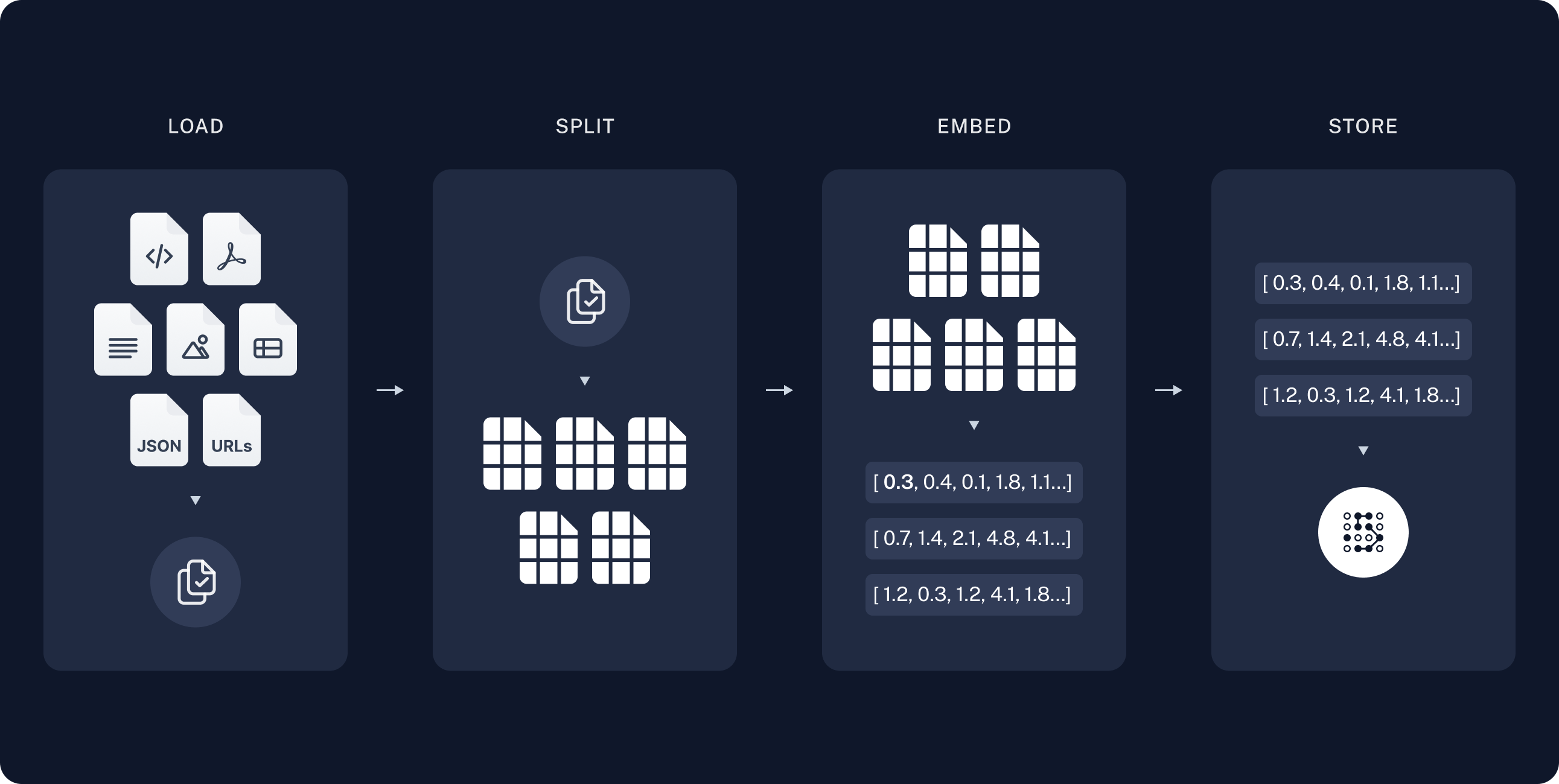
"1. **Indexing Phase**\n",
" - **Load**: Import data using DocumentLoaders.\n",
" - **Split**: Use text splitters to divide large documents into manageable chunks.\n",
" - **Store**: Index and store these chunks in a VectorStore for efficient retrieval.\n",
" - **Diagram**: Visual representation of the indexing process shows data loading, splitting, and storing in an indexed format.\n",
" \n",
" \n",
"\n",
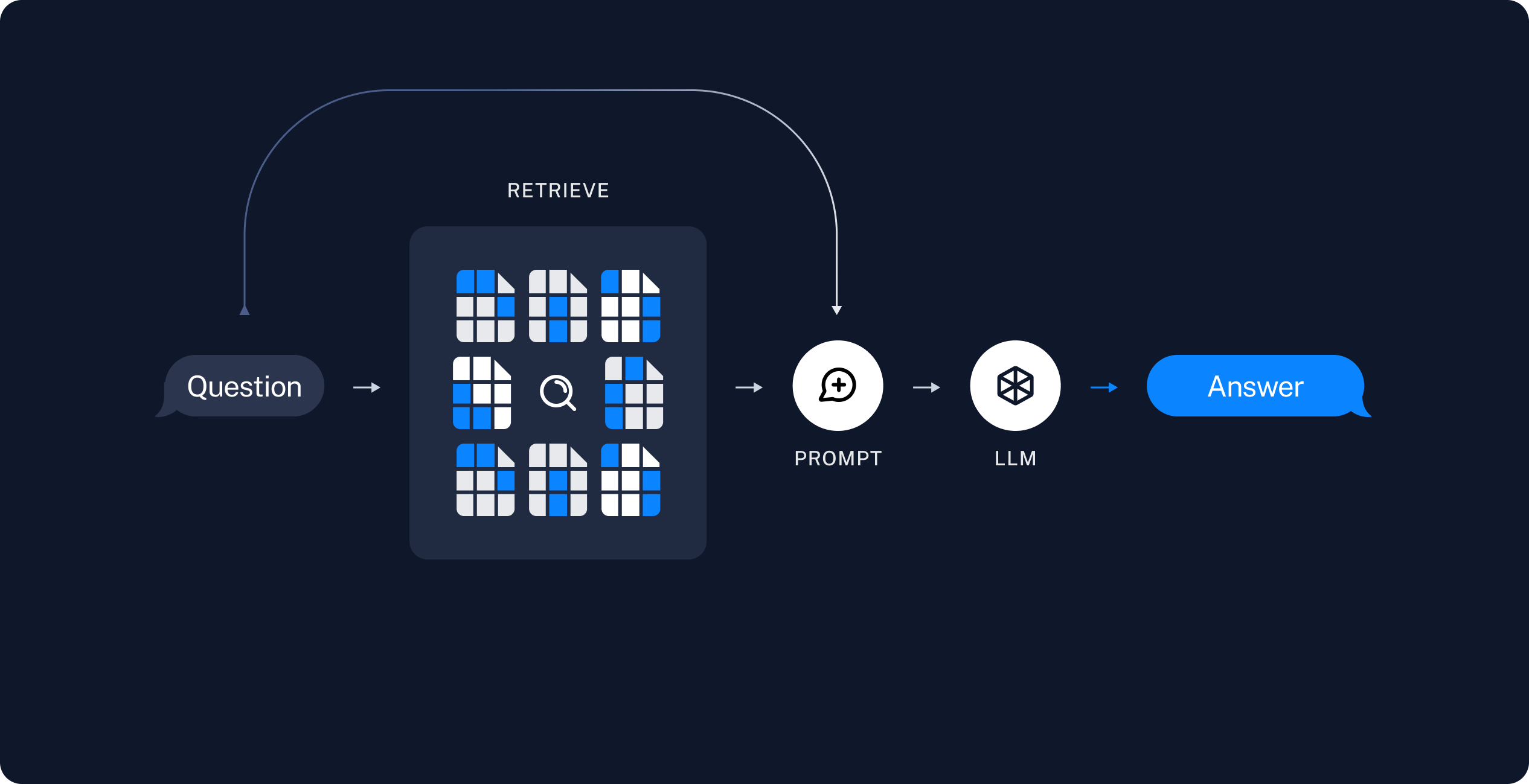
"2. **Retrieval and Generation Phase**\n",
" - **Retrieve**: Upon receiving a user query, the system retrieves the most relevant chunks of data from the VectorStore.\n",
" - **Generate**: The retrieved data, combined with the user’s query, is used by the LLM to generate a coherent and relevant answer.\n",
"\n",
" \n",
"\n",
"### Tools and Technologies\n",
"- **LangChain**: Provides components to build Q&A applications and RAG systems.\n",
"- **DocumentLoaders**: For loading data into the system.\n",
"- **Text Splitters**: For breaking down documents into smaller chunks.\n",
"- **VectorStore**: For storing and indexing data chunks.\n",
"- **Embeddings Model**: To transform data chunks into searchable vector representations.\n",
"- **Retriever**: To fetch relevant data chunks based on user queries.\n",
"- **ChatModel/LLM**: To generate answers using the retrieved data and user query.\n",
"\n",
"### Example Application Workflow\n",
"1. **Data Ingestion**: Load a large text document using DocumentLoaders.\n",
"2. **Data Preparation**: Split the document into smaller, manageable chunks with text splitters.\n",
"3. **Data Indexing**: Store these chunks in a VectorStore, indexed using an Embeddings model.\n",
"4. **Query Processing**:\n",
" - When a user submits a query, the Retriever searches the VectorStore for relevant data chunks.\n",
" - The retrieved data is combined with the user’s query and fed into a ChatModel or LLM.\n",
" - The model generates and returns a relevant answer to the user.\n",
"\n",
"### Advanced Techniques and Resources\n",
"- **LangSmith**: A tool to trace and understand the application, becoming more valuable as the application's complexity increases.\n",
"- **RAG over Structured Data**: For those interested in applying RAG to structured data like SQL databases, that can also possible using LangChain.\n",
"\n",
"\n",
"\n",
"let's dive into hands-on coding!"
],
"metadata": {
"id": "9pqIayDEqhGG"
}
},
{
"cell_type": "markdown",
"source": [
"## Installation & setup\n"
],
"metadata": {
"id": "SGUxQkmNz6xW"
}
},
{
"cell_type": "code",
"source": [
"!pip install -q langchain"
],
"metadata": {
"id": "mY03kLcmumtg"
},
"execution_count": null,
"outputs": []
},
{
"cell_type": "markdown",
"source": [
"## LangSmith\n",
"When building applications with LangChain, multiple steps and LLM calls often become complex. To effectively inspect and understand the internal workings of your chain or agent, LangSmith is the best tool for the job.\n",
"\n",
"After langsmith signup, make sure to set your environment variables to start logging traces:\n",
"\n"
],
"metadata": {
"id": "cr-my_K1s6jG"
}
},
{
"cell_type": "code",
"source": [
"import os\n",
"from google.colab import userdata\n",
"\n",
"os.environ[\"LANGCHAIN_TRACING_V2\"] = \"true\"\n",
"os.environ[\"LANGCHAIN_API_KEY\"] = userdata.get(\"LANGCHAIN_API_KEY\")"
],
"metadata": {
"id": "CB6IMiA-vSh9"
},
"execution_count": null,
"outputs": []
},
{
"cell_type": "code",
"source": [
"os.environ[\"HUGGINGFACEHUB_API_TOKEN\"] = userdata.get(\"HUGGINGFACEHUB_API_TOKEN\")"
],
"metadata": {
"id": "dCocspP70IW8"
},
"execution_count": null,
"outputs": []
},
{
"cell_type": "code",
"source": [],
"metadata": {
"id": "0rQVERvxeNJQ"
},
"execution_count": null,
"outputs": []
},
{
"cell_type": "markdown",
"source": [
"## 1. Indexing: Load\n",
"In this guide we’ll build a QA app over python.org FAQ's website(https://docs.python.org/3/faq/index.html).\n",
"\n",
"- We need tp first load the FAQ's from the python faq's url for this we can use the document loaded which loaded in data from source and return a list of documents. A document is an object with some page_content(str) and metadata (dict)\n",
"- In this case we use the WebBasedloader which users the urllib to load HTML from web URLs and BeautifulSoup to parse it to text.\n",
"- In this case only HTML tags with class `body` from list of urls are relevent, so we'll remove all other=."
],
"metadata": {
"id": "7Otg49WG8GWW"
}
},
{
"cell_type": "code",
"source": [
"!pip install -q bs4\n",
"!pip install -q langchain_community"
],
"metadata": {
"id": "MLhYs3d7__0E"
},
"execution_count": null,
"outputs": []
},
{
"cell_type": "code",
"source": [
"import bs4\n",
"from langchain_community.document_loaders import WebBaseLoader"
],
"metadata": {
"id": "ii-yE_9J-5Bw"
},
"execution_count": null,
"outputs": []
},
{
"cell_type": "code",
"source": [
"web_paths = (\"https://docs.python.org/3/faq/general.html\",\n",
" \"https://docs.python.org/3/faq/programming.html\",\n",
" \"https://docs.python.org/3/faq/design.html\",\n",
" \"https://docs.python.org/3/faq/library.html\",\n",
" \"https://docs.python.org/3/faq/extending.html\",\n",
" \"https://docs.python.org/3/faq/windows.html\",\n",
" \"https://docs.python.org/3/faq/gui.html\",\n",
" \"https://docs.python.org/3/faq/installed.html\")\n",
"\n",
"bs4_strainer = bs4.SoupStrainer(class_=(\"body\"))\n",
"\n",
"loader = WebBaseLoader(web_path=web_paths,\n",
" bs_kwargs={\"parse_only\": bs4_strainer}\n",
" )\n",
"\n",
"docs = loader.load()\n"
],
"metadata": {
"id": "xrEmBclR_xt2"
},
"execution_count": null,
"outputs": []
},
{
"cell_type": "code",
"source": [
"# check last url content\n",
"len(docs[0].page_content)"
],
"metadata": {
"colab": {
"base_uri": "https://localhost:8080/"
},
"id": "MUxSC2fOMDpG",
"outputId": "6ed3e877-895b-45f4-efa0-e07f33e70c9d"
},
"execution_count": null,
"outputs": [
{
"output_type": "execute_result",
"data": {
"text/plain": [
"18714"
]
},
"metadata": {},
"execution_count": 32
}
]
},
{
"cell_type": "code",
"source": [
"docs[0].page_content"
],
"metadata": {
"colab": {
"base_uri": "https://localhost:8080/",
"height": 125
},
"id": "BumW1qFofYjb",
"outputId": "86094e35-7d75-472c-93cd-04200b613952"
},
"execution_count": null,
"outputs": [
{
"output_type": "execute_result",
"data": {
"text/plain": [
"\"\\n\\nGeneral Python FAQ¶\\n\\nContents\\n\\nGeneral Python FAQ\\n\\nGeneral Information\\n\\nWhat is Python?\\nWhat is the Python Software Foundation?\\nAre there copyright restrictions on the use of Python?\\nWhy was Python created in the first place?\\nWhat is Python good for?\\nHow does the Python version numbering scheme work?\\nHow do I obtain a copy of the Python source?\\nHow do I get documentation on Python?\\nI’ve never programmed before. Is there a Python tutorial?\\nIs there a newsgroup or mailing list devoted to Python?\\nHow do I get a beta test version of Python?\\nHow do I submit bug reports and patches for Python?\\nAre there any published articles about Python that I can reference?\\nAre there any books on Python?\\nWhere in the world is www.python.org located?\\nWhy is it called Python?\\nDo I have to like “Monty Python’s Flying Circus”?\\n\\n\\nPython in the real world\\n\\nHow stable is Python?\\nHow many people are using Python?\\nHave any significant projects been done in Python?\\nWhat new developments are expected for Python in the future?\\nIs it reasonable to propose incompatible changes to Python?\\nIs Python a good language for beginning programmers?\\n\\n\\n\\n\\n\\n\\n\\nGeneral Information¶\\n\\nWhat is Python?¶\\nPython is an interpreted, interactive, object-oriented programming language. It\\nincorporates modules, exceptions, dynamic typing, very high level dynamic data\\ntypes, and classes. It supports multiple programming paradigms beyond\\nobject-oriented programming, such as procedural and functional programming.\\nPython combines remarkable power with very clear syntax. It has interfaces to\\nmany system calls and libraries, as well as to various window systems, and is\\nextensible in C or C++. It is also usable as an extension language for\\napplications that need a programmable interface. Finally, Python is portable:\\nit runs on many Unix variants including Linux and macOS, and on Windows.\\nTo find out more, start with The Python Tutorial. The Beginner’s Guide to\\nPython links to other\\nintroductory tutorials and resources for learning Python.\\n\\n\\nWhat is the Python Software Foundation?¶\\nThe Python Software Foundation is an independent non-profit organization that\\nholds the copyright on Python versions 2.1 and newer. The PSF’s mission is to\\nadvance open source technology related to the Python programming language and to\\npublicize the use of Python. The PSF’s home page is at\\nhttps://www.python.org/psf/.\\nDonations to the PSF are tax-exempt in the US. If you use Python and find it\\nhelpful, please contribute via the PSF donation page.\\n\\n\\nAre there copyright restrictions on the use of Python?¶\\nYou can do anything you want with the source, as long as you leave the\\ncopyrights in and display those copyrights in any documentation about Python\\nthat you produce. If you honor the copyright rules, it’s OK to use Python for\\ncommercial use, to sell copies of Python in source or binary form (modified or\\nunmodified), or to sell products that incorporate Python in some form. We would\\nstill like to know about all commercial use of Python, of course.\\nSee the license page to find further\\nexplanations and the full text of the PSF License.\\nThe Python logo is trademarked, and in certain cases permission is required to\\nuse it. Consult the Trademark Usage Policy for more information.\\n\\n\\nWhy was Python created in the first place?¶\\nHere’s a very brief summary of what started it all, written by Guido van\\nRossum:\\n\\nI had extensive experience with implementing an interpreted language in the\\nABC group at CWI, and from working with this group I had learned a lot about\\nlanguage design. This is the origin of many Python features, including the\\nuse of indentation for statement grouping and the inclusion of\\nvery-high-level data types (although the details are all different in\\nPython).\\nI had a number of gripes about the ABC language, but also liked many of its\\nfeatures. It was impossible to extend the ABC language (or its\\nimplementation) to remedy my complaints – in fact its lack of extensibility\\nwas one of its biggest problems. I had some experience with using Modula-2+\\nand talked with the designers of Modula-3 and read the Modula-3 report.\\nModula-3 is the origin of the syntax and semantics used for exceptions, and\\nsome other Python features.\\nI was working in the Amoeba distributed operating system group at CWI. We\\nneeded a better way to do system administration than by writing either C\\nprograms or Bourne shell scripts, since Amoeba had its own system call\\ninterface which wasn’t easily accessible from the Bourne shell. My\\nexperience with error handling in Amoeba made me acutely aware of the\\nimportance of exceptions as a programming language feature.\\nIt occurred to me that a scripting language with a syntax like ABC but with\\naccess to the Amoeba system calls would fill the need. I realized that it\\nwould be foolish to write an Amoeba-specific language, so I decided that I\\nneeded a language that was generally extensible.\\nDuring the 1989 Christmas holidays, I had a lot of time on my hand, so I\\ndecided to give it a try. During the next year, while still mostly working\\non it in my own time, Python was used in the Amoeba project with increasing\\nsuccess, and the feedback from colleagues made me add many early\\nimprovements.\\nIn February 1991, after just over a year of development, I decided to post to\\nUSENET. The rest is in the Misc/HISTORY file.\\n\\n\\n\\nWhat is Python good for?¶\\nPython is a high-level general-purpose programming language that can be applied\\nto many different classes of problems.\\nThe language comes with a large standard library that covers areas such as\\nstring processing (regular expressions, Unicode, calculating differences between\\nfiles), internet protocols (HTTP, FTP, SMTP, XML-RPC, POP, IMAP),\\nsoftware engineering (unit testing, logging, profiling, parsing\\nPython code), and operating system interfaces (system calls, filesystems, TCP/IP\\nsockets). Look at the table of contents for The Python Standard Library to get an idea\\nof what’s available. A wide variety of third-party extensions are also\\navailable. Consult the Python Package Index to\\nfind packages of interest to you.\\n\\n\\nHow does the Python version numbering scheme work?¶\\nPython versions are numbered “A.B.C” or “A.B”:\\n\\nA is the major version number – it is only incremented for really major\\nchanges in the language.\\nB is the minor version number – it is incremented for less earth-shattering\\nchanges.\\nC is the micro version number – it is incremented for each bugfix release.\\n\\nNot all releases are bugfix releases. In the run-up to a new feature release, a\\nseries of development releases are made, denoted as alpha, beta, or release\\ncandidate. Alphas are early releases in which interfaces aren’t yet finalized;\\nit’s not unexpected to see an interface change between two alpha releases.\\nBetas are more stable, preserving existing interfaces but possibly adding new\\nmodules, and release candidates are frozen, making no changes except as needed\\nto fix critical bugs.\\nAlpha, beta and release candidate versions have an additional suffix:\\n\\nThe suffix for an alpha version is “aN” for some small number N.\\nThe suffix for a beta version is “bN” for some small number N.\\nThe suffix for a release candidate version is “rcN” for some small number N.\\n\\nIn other words, all versions labeled 2.0aN precede the versions labeled\\n2.0bN, which precede versions labeled 2.0rcN, and those precede 2.0.\\nYou may also find version numbers with a “+” suffix, e.g. “2.2+”. These are\\nunreleased versions, built directly from the CPython development repository. In\\npractice, after a final minor release is made, the version is incremented to the\\nnext minor version, which becomes the “a0” version, e.g. “2.4a0”.\\nSee the Developer’s Guide\\nfor more information about the development cycle, and\\nPEP 387 to learn more about Python’s backward compatibility policy. See also\\nthe documentation for sys.version, sys.hexversion, and\\nsys.version_info.\\n\\n\\nHow do I obtain a copy of the Python source?¶\\nThe latest Python source distribution is always available from python.org, at\\nhttps://www.python.org/downloads/. The latest development sources can be obtained\\nat https://github.com/python/cpython/.\\nThe source distribution is a gzipped tar file containing the complete C source,\\nSphinx-formatted documentation, Python library modules, example programs, and\\nseveral useful pieces of freely distributable software. The source will compile\\nand run out of the box on most UNIX platforms.\\nConsult the Getting Started section of the Python Developer’s Guide for more\\ninformation on getting the source code and compiling it.\\n\\n\\nHow do I get documentation on Python?¶\\nThe standard documentation for the current stable version of Python is available\\nat https://docs.python.org/3/. PDF, plain text, and downloadable HTML versions are\\nalso available at https://docs.python.org/3/download.html.\\nThe documentation is written in reStructuredText and processed by the Sphinx\\ndocumentation tool. The reStructuredText source for\\nthe documentation is part of the Python source distribution.\\n\\n\\nI’ve never programmed before. Is there a Python tutorial?¶\\nThere are numerous tutorials and books available. The standard documentation\\nincludes The Python Tutorial.\\nConsult the Beginner’s Guide to\\nfind information for beginning Python programmers, including lists of tutorials.\\n\\n\\nIs there a newsgroup or mailing list devoted to Python?¶\\nThere is a newsgroup, comp.lang.python, and a mailing list,\\npython-list. The\\nnewsgroup and mailing list are gatewayed into each other – if you can read news\\nit’s unnecessary to subscribe to the mailing list.\\ncomp.lang.python is high-traffic, receiving hundreds of postings\\nevery day, and Usenet readers are often more able to cope with this volume.\\nAnnouncements of new software releases and events can be found in\\ncomp.lang.python.announce, a low-traffic moderated list that receives about five\\npostings per day. It’s available as the python-announce mailing list.\\nMore info about other mailing lists and newsgroups\\ncan be found at https://www.python.org/community/lists/.\\n\\n\\nHow do I get a beta test version of Python?¶\\nAlpha and beta releases are available from https://www.python.org/downloads/. All\\nreleases are announced on the comp.lang.python and comp.lang.python.announce\\nnewsgroups and on the Python home page at https://www.python.org/; an RSS feed of\\nnews is available.\\nYou can also access the development version of Python through Git. See\\nThe Python Developer’s Guide for details.\\n\\n\\nHow do I submit bug reports and patches for Python?¶\\nTo report a bug or submit a patch, use the issue tracker at\\nhttps://github.com/python/cpython/issues.\\nFor more information on how Python is developed, consult the Python Developer’s\\nGuide.\\n\\n\\nAre there any published articles about Python that I can reference?¶\\nIt’s probably best to cite your favorite book about Python.\\nThe very first article about Python was\\nwritten in 1991 and is now quite outdated.\\n\\nGuido van Rossum and Jelke de Boer, “Interactively Testing Remote Servers\\nUsing the Python Programming Language”, CWI Quarterly, Volume 4, Issue 4\\n(December 1991), Amsterdam, pp 283–303.\\n\\n\\n\\nAre there any books on Python?¶\\nYes, there are many, and more are being published. See the python.org wiki at\\nhttps://wiki.python.org/moin/PythonBooks for a list.\\nYou can also search online bookstores for “Python” and filter out the Monty\\nPython references; or perhaps search for “Python” and “language”.\\n\\n\\nWhere in the world is www.python.org located?¶\\nThe Python project’s infrastructure is located all over the world and is managed\\nby the Python Infrastructure Team. Details here.\\n\\n\\nWhy is it called Python?¶\\nWhen he began implementing Python, Guido van Rossum was also reading the\\npublished scripts from “Monty Python’s Flying Circus”, a BBC comedy series from the 1970s. Van Rossum\\nthought he needed a name that was short, unique, and slightly mysterious, so he\\ndecided to call the language Python.\\n\\n\\nDo I have to like “Monty Python’s Flying Circus”?¶\\nNo, but it helps. :)\\n\\n\\n\\nPython in the real world¶\\n\\nHow stable is Python?¶\\nVery stable. New, stable releases have been coming out roughly every 6 to 18\\nmonths since 1991, and this seems likely to continue. As of version 3.9,\\nPython will have a new feature release every 12 months (PEP 602).\\nThe developers issue bugfix releases of older versions, so the stability of\\nexisting releases gradually improves. Bugfix releases, indicated by a third\\ncomponent of the version number (e.g. 3.5.3, 3.6.2), are managed for stability;\\nonly fixes for known problems are included in a bugfix release, and it’s\\nguaranteed that interfaces will remain the same throughout a series of bugfix\\nreleases.\\nThe latest stable releases can always be found on the Python download page. There are two production-ready versions\\nof Python: 2.x and 3.x. The recommended version is 3.x, which is supported by\\nmost widely used libraries. Although 2.x is still widely used, it is not\\nmaintained anymore.\\n\\n\\nHow many people are using Python?¶\\nThere are probably millions of users, though it’s difficult to obtain an exact\\ncount.\\nPython is available for free download, so there are no sales figures, and it’s\\navailable from many different sites and packaged with many Linux distributions,\\nso download statistics don’t tell the whole story either.\\nThe comp.lang.python newsgroup is very active, but not all Python users post to\\nthe group or even read it.\\n\\n\\nHave any significant projects been done in Python?¶\\nSee https://www.python.org/about/success for a list of projects that use Python.\\nConsulting the proceedings for past Python conferences will reveal contributions from many\\ndifferent companies and organizations.\\nHigh-profile Python projects include the Mailman mailing list manager and the Zope application server. Several Linux distributions, most notably Red Hat, have written part or all of their installer and\\nsystem administration software in Python. Companies that use Python internally\\ninclude Google, Yahoo, and Lucasfilm Ltd.\\n\\n\\nWhat new developments are expected for Python in the future?¶\\nSee https://peps.python.org/ for the Python Enhancement Proposals\\n(PEPs). PEPs are design documents describing a suggested new feature for Python,\\nproviding a concise technical specification and a rationale. Look for a PEP\\ntitled “Python X.Y Release Schedule”, where X.Y is a version that hasn’t been\\npublicly released yet.\\nNew development is discussed on the python-dev mailing list.\\n\\n\\nIs it reasonable to propose incompatible changes to Python?¶\\nIn general, no. There are already millions of lines of Python code around the\\nworld, so any change in the language that invalidates more than a very small\\nfraction of existing programs has to be frowned upon. Even if you can provide a\\nconversion program, there’s still the problem of updating all documentation;\\nmany books have been written about Python, and we don’t want to invalidate them\\nall at a single stroke.\\nProviding a gradual upgrade path is necessary if a feature has to be changed.\\nPEP 5 describes the procedure followed for introducing backward-incompatible\\nchanges while minimizing disruption for users.\\n\\n\\nIs Python a good language for beginning programmers?¶\\nYes.\\nIt is still common to start students with a procedural and statically typed\\nlanguage such as Pascal, C, or a subset of C++ or Java. Students may be better\\nserved by learning Python as their first language. Python has a very simple and\\nconsistent syntax and a large standard library and, most importantly, using\\nPython in a beginning programming course lets students concentrate on important\\nprogramming skills such as problem decomposition and data type design. With\\nPython, students can be quickly introduced to basic concepts such as loops and\\nprocedures. They can probably even work with user-defined objects in their very\\nfirst course.\\nFor a student who has never programmed before, using a statically typed language\\nseems unnatural. It presents additional complexity that the student must master\\nand slows the pace of the course. The students are trying to learn to think\\nlike a computer, decompose problems, design consistent interfaces, and\\nencapsulate data. While learning to use a statically typed language is\\nimportant in the long term, it is not necessarily the best topic to address in\\nthe students’ first programming course.\\nMany other aspects of Python make it a good first language. Like Java, Python\\nhas a large standard library so that students can be assigned programming\\nprojects very early in the course that do something. Assignments aren’t\\nrestricted to the standard four-function calculator and check balancing\\nprograms. By using the standard library, students can gain the satisfaction of\\nworking on realistic applications as they learn the fundamentals of programming.\\nUsing the standard library also teaches students about code reuse. Third-party\\nmodules such as PyGame are also helpful in extending the students’ reach.\\nPython’s interactive interpreter enables students to test language features\\nwhile they’re programming. They can keep a window with the interpreter running\\nwhile they enter their program’s source in another window. If they can’t\\nremember the methods for a list, they can do something like this:\\n>>> L = []\\n>>> dir(L) \\n['__add__', '__class__', '__contains__', '__delattr__', '__delitem__',\\n'__dir__', '__doc__', '__eq__', '__format__', '__ge__',\\n'__getattribute__', '__getitem__', '__gt__', '__hash__', '__iadd__',\\n'__imul__', '__init__', '__iter__', '__le__', '__len__', '__lt__',\\n'__mul__', '__ne__', '__new__', '__reduce__', '__reduce_ex__',\\n'__repr__', '__reversed__', '__rmul__', '__setattr__', '__setitem__',\\n'__sizeof__', '__str__', '__subclasshook__', 'append', 'clear',\\n'copy', 'count', 'extend', 'index', 'insert', 'pop', 'remove',\\n'reverse', 'sort']\\n>>> [d for d in dir(L) if '__' not in d]\\n['append', 'clear', 'copy', 'count', 'extend', 'index', 'insert', 'pop', 'remove', 'reverse', 'sort']\\n\\n>>> help(L.append)\\nHelp on built-in function append:\\n\\nappend(...)\\n L.append(object) -> None -- append object to end\\n\\n>>> L.append(1)\\n>>> L\\n[1]\\n\\n\\nWith the interpreter, documentation is never far from the student as they are\\nprogramming.\\nThere are also good IDEs for Python. IDLE is a cross-platform IDE for Python\\nthat is written in Python using Tkinter.\\nEmacs users will be happy to know that there is a very good Python mode for\\nEmacs. All of these programming environments provide syntax highlighting,\\nauto-indenting, and access to the interactive interpreter while coding. Consult\\nthe Python wiki for a full list\\nof Python editing environments.\\nIf you want to discuss Python’s use in education, you may be interested in\\njoining the edu-sig mailing list.\\n\\n\\n\\n\\n\""
],
"application/vnd.google.colaboratory.intrinsic+json": {
"type": "string"
}
},
"metadata": {},
"execution_count": 33
}
]
},
{
"cell_type": "markdown",
"source": [
"# 2. Indexing: Split\n",
"\n",
"* Our loaded document exceeds 18,714 characters, which is too long for many models' context windows. To manage this, we'll split the document into chunks for embedding and vector storage. This approach helps retrieve the most relevant parts of the blog post at runtime.\n",
"\n",
"* We'll divide the document into 1,000-character chunks with a 200-character overlap to maintain important context. Using `RecursiveCharacterTextSplitter`, we split the document with common separators like new lines until each chunk is the correct size. This splitter is ideal for generic text use cases.\n",
"\n",
"* By setting `add_start_index=True`, we preserve the start index of each chunk as the \"start_index\" metadata attribute."
],
"metadata": {
"id": "lz1sFo0Uf81g"
}
},
{
"cell_type": "code",
"source": [
"from langchain.text_splitter import RecursiveCharacterTextSplitter"
],
"metadata": {
"id": "OR8yohQgfgOT"
},
"execution_count": null,
"outputs": []
},
{
"cell_type": "code",
"source": [
"text_splitter = RecursiveCharacterTextSplitter(chunk_size=1000, chunk_overlap=200, add_start_index=True)\n",
"all_splits = text_splitter.split_documents(docs)\n",
"print(len(all_splits))\n",
"print(len(all_splits[0].page_content))"
],
"metadata": {
"colab": {
"base_uri": "https://localhost:8080/"
},
"id": "e6LpLGklRgXK",
"outputId": "c212a484-5daa-4df0-8321-257adaaca224"
},
"execution_count": null,
"outputs": [
{
"output_type": "stream",
"name": "stdout",
"text": [
"249\n",
"841\n"
]
}
]
},
{
"cell_type": "code",
"source": [
"all_splits[240].metadata"
],
"metadata": {
"colab": {
"base_uri": "https://localhost:8080/"
},
"id": "tbUOEck_hEps",
"outputId": "990e9bfe-62d5-4f31-9e02-d66066138b8a"
},
"execution_count": null,
"outputs": [
{
"output_type": "execute_result",
"data": {
"text/plain": [
"{'source': 'https://docs.python.org/3/faq/windows.html', 'start_index': 9122}"
]
},
"metadata": {},
"execution_count": 36
}
]
},
{
"cell_type": "markdown",
"source": [
"# 3. Indexing: Store\n",
"To index our 249 text chunks for runtime search, we embed each document split and insert these embeddings into a vector database (vector store). For searching, we embed the query and perform a \"similarity\" search to find the splits with the most similar embeddings, often using cosine similarity. This process can be done in a single command using the Chroma vector store and HuggingFaceHubEmbeddings `sentence-transformers/all-mpnet-base-v2` model."
],
"metadata": {
"id": "h3MZNxzlhpni"
}
},
{
"cell_type": "code",
"source": [
"!pip install -q chromadb"
],
"metadata": {
"id": "-PSmfRJ5AIl9"
},
"execution_count": null,
"outputs": []
},
{
"cell_type": "code",
"source": [
"# now perform the embedding on top of this splits to store in a vector db\n",
"from langchain.embeddings import HuggingFaceHubEmbeddings\n",
"from langchain.vectorstores import Chroma\n",
"\n",
"embeddings = HuggingFaceHubEmbeddings(repo_id=\"sentence-transformers/all-mpnet-base-v2\")\n",
"\n",
"vectorstore = Chroma.from_documents(documents=all_splits, embedding=embeddings)"
],
"metadata": {
"id": "c-vW3iX3SNgb"
},
"execution_count": null,
"outputs": []
},
{
"cell_type": "markdown",
"source": [
"# 4. Retrieval and Generation: Retrieve\n",
"\n",
"Now let’s write the application logic for a simple app that takes a user question, searches for relevant documents, passes these documents and the question to a model, and returns an answer.\n",
"\n",
"First, we define the logic for searching documents using LangChain's Retriever interface, which wraps an index to return relevant documents from a string query.\n",
"\n",
"The most common Retriever is the VectorStoreRetriever, which uses vector store similarity search for retrieval. Any VectorStore can be turned into a Retriever with `VectorStore.as_retriever()`."
],
"metadata": {
"id": "sBBDuAX6i0Hu"
}
},
{
"cell_type": "code",
"source": [
"\n",
"retriever = vectorstore.as_retriever(search_type=\"similarity\", search_kwargs={\"k\": 6})\n",
"\n",
"retrieved_docs = retriever.invoke(\"How do I freeze Tkinter applications?\")\n",
"len(retrieved_docs)"
],
"metadata": {
"colab": {
"base_uri": "https://localhost:8080/"
},
"id": "G1dn9VOBVPPC",
"outputId": "daad0254-7b64-4a7c-cc40-ae9432526504"
},
"execution_count": null,
"outputs": [
{
"output_type": "execute_result",
"data": {
"text/plain": [
"6"
]
},
"metadata": {},
"execution_count": 39
}
]
},
{
"cell_type": "code",
"source": [
"print(retrieved_docs[0].page_content)"
],
"metadata": {
"colab": {
"base_uri": "https://localhost:8080/"
},
"id": "7X8ewkhWkKcm",
"outputId": "57243ea1-613f-4c87-98f9-103776027a0b"
},
"execution_count": null,
"outputs": [
{
"output_type": "stream",
"name": "stdout",
"text": [
"Tkinter questions¶\n",
"\n",
"How do I freeze Tkinter applications?¶\n",
"Freeze is a tool to create stand-alone applications. When freezing Tkinter\n",
"applications, the applications will not be truly stand-alone, as the application\n",
"will still need the Tcl and Tk libraries.\n",
"One solution is to ship the application with the Tcl and Tk libraries, and point\n",
"to them at run-time using the TCL_LIBRARY and TK_LIBRARY\n",
"environment variables.\n",
"To get truly stand-alone applications, the Tcl scripts that form the library\n",
"have to be integrated into the application as well. One tool supporting that is\n",
"SAM (stand-alone modules), which is part of the Tix distribution\n",
"(https://tix.sourceforge.net/).\n",
"Build Tix with SAM enabled, perform the appropriate call to\n",
"Tclsam_init(), etc. inside Python’s\n",
"Modules/tkappinit.c, and link with libtclsam and libtksam (you\n",
"might include the Tix libraries as well).\n"
]
}
]
},
{
"cell_type": "markdown",
"source": [
"# 5. Retrieval and Generation: Generate\n",
"\n",
"Let’s put it all together into a chain that takes a question, retrieves relevant documents, constructs a prompt, passes that to a model, and parses the output.\n",
"\n",
"We’ll use the Mistral-7B-Instruct-v0.3 HuggingFaceHub model, but any LangChain LLM or ChatModel could be substituted in."
],
"metadata": {
"id": "ifLv_xh8k4dM"
}
},
{
"cell_type": "code",
"source": [
"!pip install -q huggingface_hub"
],
"metadata": {
"id": "be_mY_ihlQx5"
},
"execution_count": null,
"outputs": []
},
{
"cell_type": "code",
"source": [
"from langchain.llms import HuggingFaceEndpoint\n",
"\n",
"repo_id = \"mistralai/Mistral-7B-Instruct-v0.3\"\n",
"llm = HuggingFaceEndpoint(repo_id=repo_id,\n",
" task=\"text-generation\",\n",
" temperature=0.3, max_new_tokens=200,\n",
" return_full_text=False,\n",
" huggingfacehub_api_token=os.environ[\"HUGGINGFACEHUB_API_TOKEN\"]\n",
" )\n"
],
"metadata": {
"colab": {
"base_uri": "https://localhost:8080/"
},
"id": "m1GNcmDLlKlc",
"outputId": "738b89f6-7ddf-4991-c5b8-31e23baa2b65"
},
"execution_count": null,
"outputs": [
{
"output_type": "stream",
"name": "stdout",
"text": [
"The token has not been saved to the git credentials helper. Pass `add_to_git_credential=True` in this function directly or `--add-to-git-credential` if using via `huggingface-cli` if you want to set the git credential as well.\n",
"Token is valid (permission: read).\n",
"Your token has been saved to /root/.cache/huggingface/token\n",
"Login successful\n"
]
}
]
},
{
"cell_type": "code",
"source": [
"# Customized prompt\n",
"from langchain_core.output_parsers import StrOutputParser\n",
"from langchain.prompts import PromptTemplate\n",
"from langchain.schema.runnable import RunnablePassthrough\n",
"from langchain.callbacks.streaming_stdout import StreamingStdOutCallbackHandler\n",
"\n",
"parser = StrOutputParser()\n",
"\n",
"template = \"\"\"Use the following pieces of context to answer the question at the end.\n",
"If you don't know the answer, just say that you don't know, don't try to make up an answer.\n",
"Use three sentences maximum and keep the answer as concise as possible.\n",
"Always say \"thanks for asking!\" at the end of the answer.\n",
"\n",
"{context}\n",
"\n",
"Question: {question}\n",
"\n",
"Helpful Answer:\"\"\"\n",
"\n",
"custom_rag_prompt = PromptTemplate.from_template(template)\n",
"\n",
"# Extract the page_content from the Document object\n",
"def extract_page_content(docs):\n",
" return \"\\n\\n\".join(doc.page_content for doc in docs)\n",
"\n",
"rag_chain = (\n",
" {\"context\": retriever | extract_page_content, \"question\": RunnablePassthrough()}\n",
" | custom_rag_prompt\n",
" | llm\n",
" | parser\n",
")\n",
"rag_chain.invoke(\"How do I freeze Tkinter applications?\")\n"
],
"metadata": {
"colab": {
"base_uri": "https://localhost:8080/",
"height": 89
},
"id": "vhrtmi06amqa",
"outputId": "ac105717-9c99-4d3b-cd72-0a774727a4dc"
},
"execution_count": null,
"outputs": [
{
"output_type": "execute_result",
"data": {
"text/plain": [
"' To freeze Tkinter applications, you can use a tool like PyInstaller or cx_Freeze. However, these tools will not create truly stand-alone applications, as they will still need the Tcl and Tk libraries. To get truly stand-alone applications, you would need to integrate the Tcl scripts that form the library into the application itself. One tool that supports this is SAM (stand-alone modules), which is part of the Tix distribution. You would need to build Tix with SAM enabled, perform the appropriate call to Tclsam_init(), etc. inside Python’s Modules/tkappinit.c, and link with libtclsam and libtksam (you might include the Tix libraries as well). Thanks for asking!'"
],
"application/vnd.google.colaboratory.intrinsic+json": {
"type": "string"
}
},
"metadata": {},
"execution_count": 61
}
]
},
{
"cell_type": "markdown",
"source": [
"### Chain Construction and Prompt Formatting flow\n",
"\n",
"The input to the prompt is expected to be a dictionary with keys `\"context\"` and `\"question\"`. The initial chain element processes these:\n",
"\n",
"- **retriever | format_docs**: Retrieves and formats documents from the question, creating Document objects and strings.\n",
"- **RunnablePassthrough()**: Passes the input question unchanged.\n",
"\n",
"- Calling `chain.invoke(question)` formats the prompt for inference. The final steps, `llm` and `StrOutputParser()`, run the inference and extract the string content. You can analyze the chain's steps using LangSmith trace."
],
"metadata": {
"id": "Da1wGgl3MARB"
}
},
{
"cell_type": "code",
"source": [],
"metadata": {
"id": "EdtoaAyHnOdo"
},
"execution_count": null,
"outputs": []
}
]
} |